
Fusion 360, the professional software at a hobbyist cost

Updated: Sep 8, 2022
In this new article we will tell you about Autodesk Fusion 360, the CAD CAM (and much more) software we use in Risen, what makes it unique and why we chose it.
The software
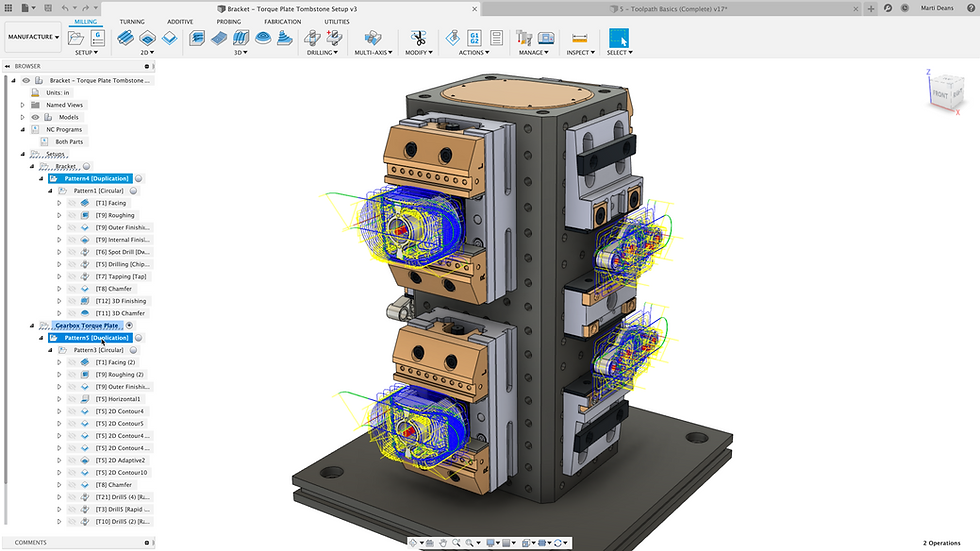
Born as a hobby software nearly 10 years ago, Fusion 360 first became the go-to software for the growing 3D printing community and is getting closer and closer to the industrial market. As the name suggests, this program is a 360 ° amalgamation of everything that can be used in a design studio, from parametric modeling to creating CNC programs. Specifically, within the user interface it is possible to switch from one work "environment" to another with a simple click, without having to export and re-import files between different softwares. The covered areas are: 1) Project, where we can model in a parametric and non-parametric way, including the possibility of modeling parts to be made in sheet metal or by plastic injection. 2) Generative design, which allows us to leverage artificial intelligence to quickly generate many iterations of the same design 3) Rendering, in order to create a photorealistic presentation of our products 4) Animation, makes it possible to create animations and video presentation / assembly instructions 5) Simulation, this is the CAM part of this software, it allows us to create programs for lathe, milling machines up to 5 axes, 3D printing and sheet metal cutting 6) Drawing, in order to create 2D drawings of our parts or assemblies We will analyze each of these aspects in detail in future posts on this same blog.
Strength points
As mentioned previously, the first strength of Fusion 360 is its incredible ability to switch from one work environment to another in a few seconds, making the workflow extremely linear and without downtime. The ability to do many of the modeling automatically, both with generative design and with the recent addition of the automatic modeling button, allows you to quickly have a draft to start with. Being an absolutely community driven software, there is a lot of information, tutorials, troubleshooting etc... on the official product forum, as well as official training courses, free webinars and a YouTube channel on which projects of interest, other tutorials and monthly updates made to the software are showcased. Updates are frequent and reflect user feedback, often bringing improvements in the user experience without upsetting the interface and having to relearn how to use the program. Very well done, the file management system, quite intuitive and allows multiple users to work on the same project at the same time, including the ability to view and comment on projects via browser, without the need to have the software installed. Last but not least, the extremely competitive price; at the time of this writing, an annual subscription to Fusion 360 costs € 586. For comparison with another Autodesk product, Inventor costs 2910 € / year

The weak points
Unfortunately, every coin has its downside and there are some to this exciting software as well. The most serious and for some limiting is that all our files are saved on an Autodesk server, de facto blocking our work in case of lack of connection and with some concerns about privacy and intellectual property. This total link to the cloud also means that when the subscription expires, all our files will be blocked unless we have exported all our work in bulk, since only a small cash of the recently used projects is saved automatically on the local system. A negative side for us Italian users is the translation, not exactly flawless, which can sometimes lead to confusion, especially since almost all the tutorials and official courses are in English. Being a relatively new software and recently moved to the industrial sector, there are few experts in the program and there are seldom in-person training courses; at least in Italy. Despite this, Autodesk partners are working hard to fill these gaps and provide their customers with all possible assistance. I take this opportunity to thank Prisma Tech SRL, through which I purchased the software and which over the years has always proven ready and reactive even in the face of these new challenges. Another indicator of the youth of the program is the optimization. In some scenarios the software absorbs a large amount of system resources for no apparent reason and then runs smoothly in theoretically stressful situations. The 2D drawing part is definitely a sore point, lacking in options and not very intuitive; having said this, it must be recognized that the latest updates have been entirely dedicated to this aspect, precisely to try to fill in the gaps. Finally a neutral point. The most demanding tasks such as rendering and resolving a simulation study can be done both locally and through the Autodesk server. If we decide for this second option, the computation will cost us additional credits, which can be purchased as an extra to the subscription. Instead, we are forced to use credits for generative design, made only via the server.
Our choice

The choice of this software was probably the first we made on a company level. Having the need to cover numerous areas of interest in the industrial development of a product, a suite of products was needed that would allow us to be able to help our customers in all their requests. Given that in order to have the same flexibility with other software we would have had to buy at least 3 different licenses at much higher costs, we opted for the cheapest solution, even if it was not the only element of choice. Another winning point of this option is the experience gained in the past years in the use of this software, especially in the CAD and CAM part. Fusion 360 is proving absolutely up to the task; we are collaborating with various companies both for static resistance analysis and for the creation of CAM paths and CAD modeling of equipment and parts; jobs that we would not have acquired without this software.
Conclusions
Fusion 360 is the software we use every day and we are surprised every day by the incredible potential of a software that until recently was used only at a hobby level. The low cost for such a package of options is certainly a great option, especially for small businesses or fledgling companies. In the next blog articles we will analyze in more detail the work environments used in this program.


Comments